Digital transformation has shifted from being a long-term strategic goal to an operational necessity. Businesses are under pressure to automate workflows, accelerate decision-making, and build internal applications faster than ever. Yet most teams still depend on traditional development cycles or complex no-code tools that require significant setup and technical understanding.
ChartApps’ new AI-powered app creation capabilities transform this landscape entirely. With a single prompt, users can now generate fully structured, logic-driven applications that previously required hours of manual configuration. This advancement positions ChartApps as a leading platform for organizations seeking scalable, intelligent, and rapid digital solutions.
This article explores how ChartApps implements AI, the technology behind it, and why it dramatically improves speed, accuracy, and productivity across all business functions.
How ChartApps AI Works
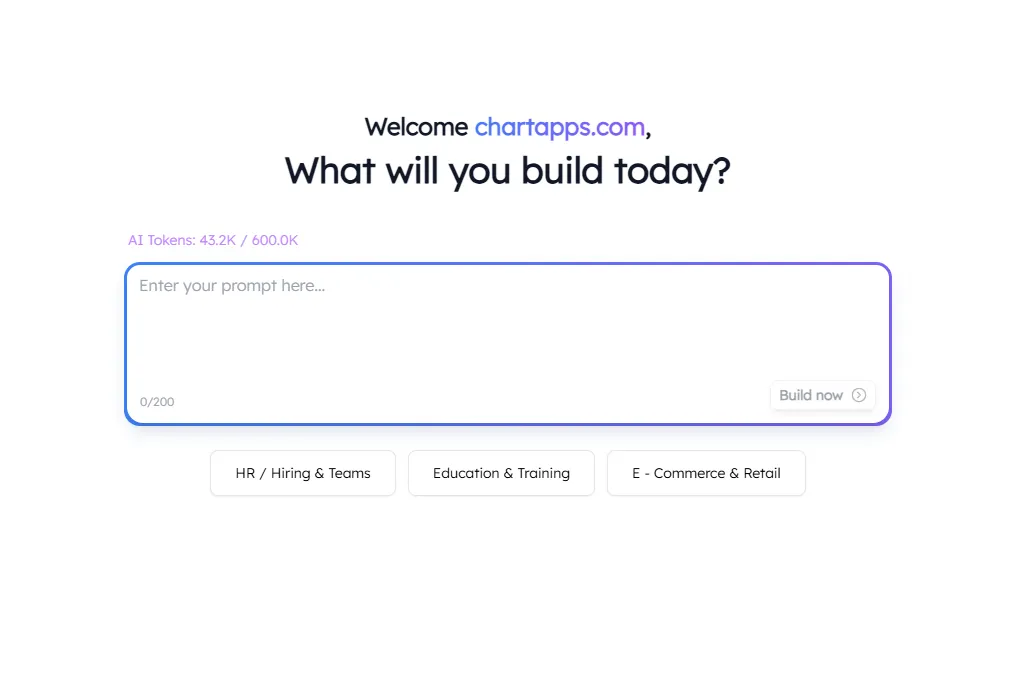
To understand why ChartApps AI is so impactful, it is essential to review how it works behind the scenes. When users input a prompt such as “Create an employee directory with search and profile pages." the App generator AI instantly analyzes the intent. It identifies the required pages, workflows, fields, and layouts needed to bring that idea to life. This level of automation allows even complex applications to be generated within minutes.
Additionally, ChartApps AI integrates seamlessly with Google Sheets. The system maps fields, reads metadata, and constructs data models automatically.
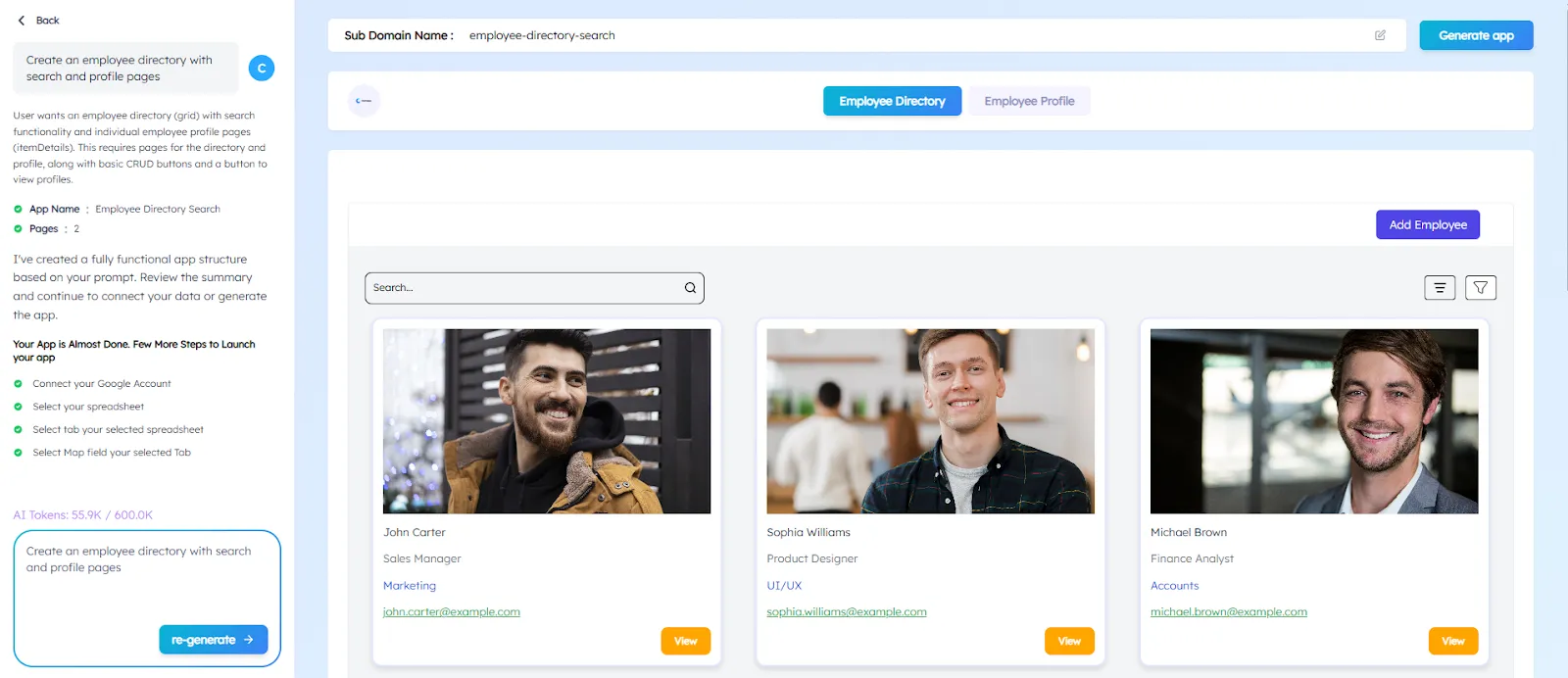
Once the initial blueprint is generated, users receive a live preview populated with smart dummy data, allowing them to visualize the entire structure before finalizing. This streamlined approach makes the development journey faster, clearer, and significantly more intuitive.
Benefits of Using ChartApps AI for Application Development
Significantly reduces development time
- Eliminates the need for manually planning UI components, mapping data flows, or coding each page.
- A simple prompt generates complete structures and designs, accelerating build, iteration, and deployment.
Lowers overall development costs
- Reduces dependency on large engineering teams for creating internal tools or lightweight applications.
- Enables non-technical teams to build production-ready software without coding expertise.
Optimizes business resource allocation
- Saves both time and financial investment that would otherwise go into repetitive development tasks.
- Allows companies to shift focus toward more strategic and high-impact initiatives.
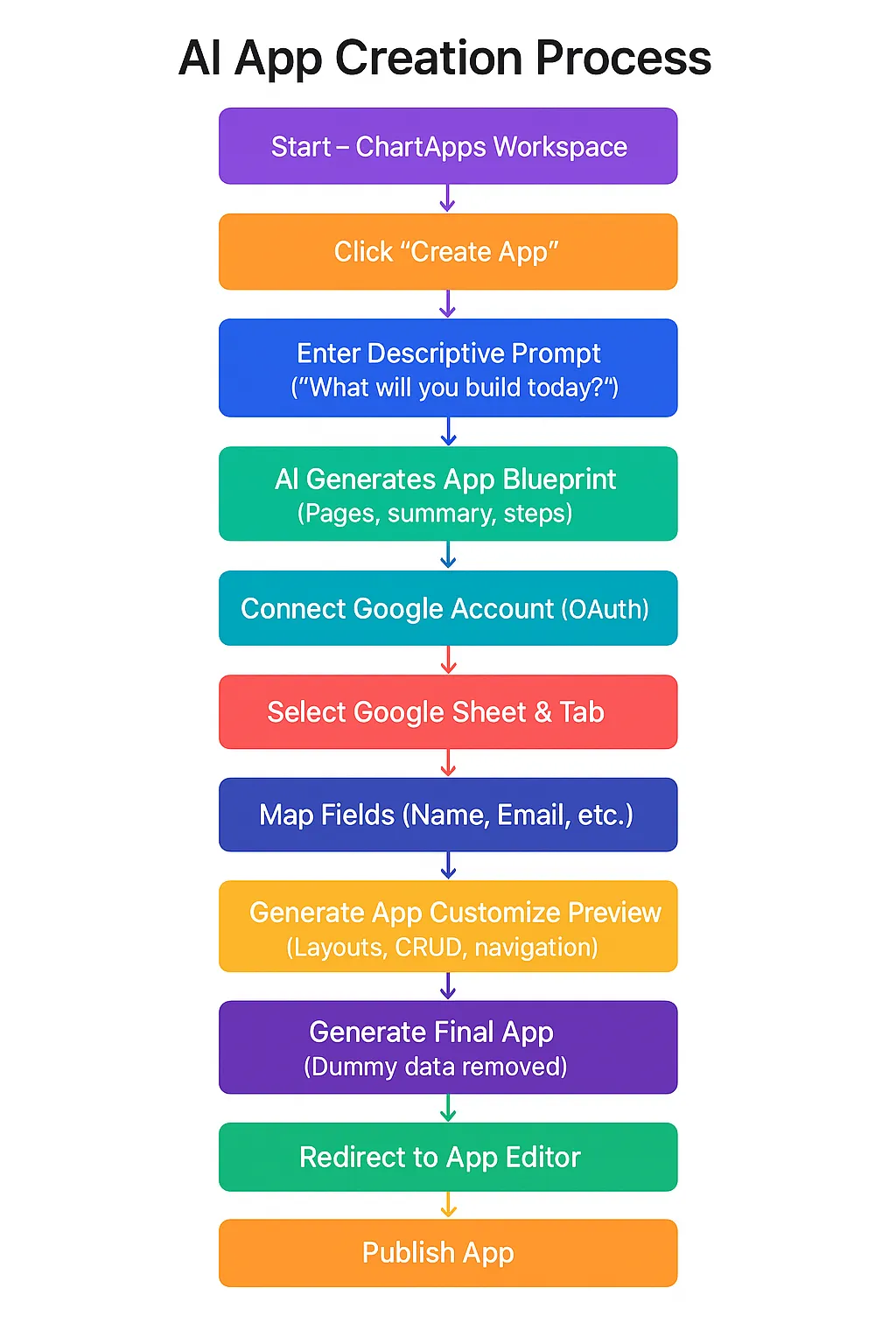
Step-by-Step Guide to Creating an App with ChartApps AI
Building an application with ChartApps AI is designed to be intuitive, fast, and entirely user-friendly. Whether you're creating a simple internal tool or a fully functional workflow app, the process requires no coding, just clarity of intent. Below is a complete walkthrough of how users move from an empty workspace to a fully functional, data-driven application.
1. Starting From the Workspace
The journey begins inside your ChartApps workspace. With a single click on the “Create App” button, users initiate the AI Builder experience.
This step transitions the user from exploring the workspace to actively building an application using AI, kickstarting the creation process instantly.
2. Write a Clear Descriptive Prompt
- Upon entering the AI Builder, users are greeted with a simple yet powerful question: “What will you build today?”
- Here, users provide a short descriptive prompt (up to 200 characters). This single sentence becomes the foundation of the entire application.
Example:
“Build an Employee Directory with Search and Profile Pages”
3. Generating the App Blueprint
Once the user clicks “Build Now,” ChartApps AI constructs the first draft of the application.
On the Blueprint Panel displayed on the left side, the user sees:
- Number of pages the app will include
- A concise summary of the application
- A list of steps needed before launching
This blueprint creates transparency and builds trust, confirming that the AI has correctly understood the request.
Behind the scenes, the AI has already mapped out:
- Page structures
- Required actions and buttons
- Workflow logic that ties the app together
4. Connecting a Google Account
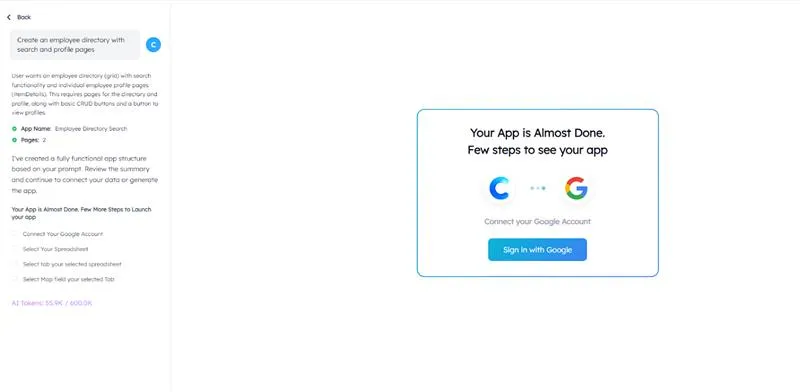
Next, users are guided through a seamless OAuth flow to connect their Google Account. This is required to integrate Google Sheets as the data source.
The process includes:
- Selecting the appropriate Google account
- Granting the necessary permissions
- Automatically redirecting back to ChartApps
Permissions requested may include reading Sheets files, accessing tabs within them, and adding or editing rows, ensuring smooth read-write functionality for the app.
Behind the scenes, ChartApps AI retrieves the list of available Google Sheets and displays them without reading your actual row data yet only metadata.
5. Selecting the Spreadsheet and Sheet
Once connected, users select the Google Sheet that will power their application.
The AI displays all available tabs (sheets) inside the selected file, helping users choose the primary data source.
Again, only metadata is analyzed at this stage, ensuring user privacy and efficiency.
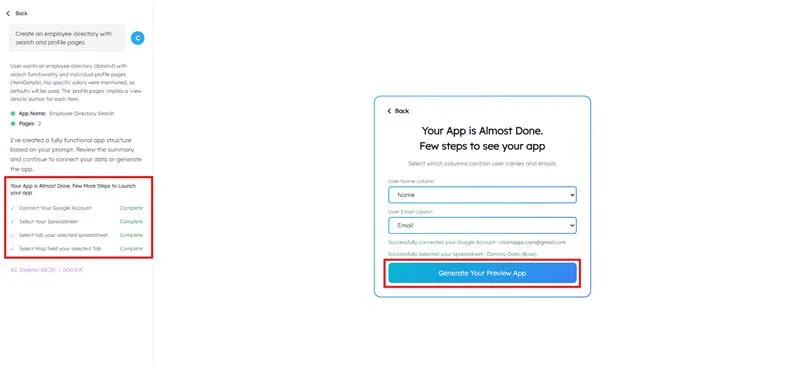
6. Mapping Tabs and Fields
Users then map essential fields from their spreadsheet, including:
- The primary tab for app data
- The column representing the “Name” field
- The column representing the “Email” or other key data points
After mapping the fields, clicking “Generate Your App Preview” triggers the next major step: AI-generated visualization.
7. AI builds the Interactive App Preview
ChartApps AI now produces a complete mock version of the application powered by structured dummy data.
This preview includes:
- Fully generated pages
- Layouts and UI blocks
- CRUD functionality
- Navigation menus
- Forms and charts
- Table and list placeholders
To help users visualize the structure clearly, dummy data automatically populates:
- Scorecards
- Charts
- Tables
- Detail views
- Forms
- Datalist blocks
This stage allows users to understand how the app will function before connecting real data.
8. Reviewing and Customizing the Preview
At this stage, users can explore the interactive preview and make refinements. The users can:
- Navigate through every page
- Test CRUD interactions using dummy data
- Inspect forms and table structures
- Adjust their prompt and re-generate a new version
- Evaluate and choose preferred UI layouts
- Identify what to replace with real data in the final editor
The preview acts as a safe sandbox for experimentation, ensuring clarity before committing to the final build.
9. Finalizing the App Structure
Once the user is satisfied with the layout, page structure, and dummy workflows, click “Generate App.” This triggers the final generation phase.
It’s important to note that dummy data exists solely for visualization and does not get published as part of the final application.
10. Redirect to the Full App Editor
After the AI finishes generating the real application, users are automatically redirected to the ChartApps App Editor.
This is where the final personalization happens.
11. Replacing Dummy Data and Refining the App
Inside the App Editor, users have full control. The users can:
- Replace dummy data with real Google Sheet data
- Modify colors, components, and layouts
- Add or remove pages and blocks
- Customize forms, sorting, filtering, and validation
- Adjust chart data sources and field mappings
- Add new actions, workflows, and buttons
- Replace placeholder elements with actual content
This editor serves as the final stage where design, data, and functionality come together.
12. Publish
Once the application is ready, users can publish it with a single click.
Post-launch, they can monitor performance, gather user feedback, and update workflows or layouts as requirements evolve.
This continuous iteration ensures the app remains aligned with business needs.
Real-Life Examples of Applications Built with ChartApps AI
ChartApps AI has powered a wide range of applications across industries. For instance, small businesses frequently use the platform to create CRM dashboards, order-tracking solutions, and even sales pipeline trackers that help teams monitor leads, opportunities, and revenue forecasts. These systems, generated from a simple prompt, allow businesses to streamline workflows without requiring expensive custom development.
Educational institutions also rely on ChartApps AI to build attendance trackers, student portals, course management systems, and administrative dashboards. Because the platform supports spreadsheet integrations, schools can effortlessly convert existing data into dynamic applications. Likewise, HR teams develop employee directories, performance trackers, and recruiting dashboards using no-code AI tools built for flexibility and speed.
How ChartApps AI Empowers Teams and Organizations
ChartApps AI enhances collaboration between teams by simplifying the development process. Business teams can build initial prototypes, experiment with workflows, and validate ideas before involving engineering departments. This leads to faster alignment and smoother transitions from concept to production.
Additionally, organizations benefit from scalable workflows. As teams iterate on their applications, the AI ensures that structure, design, and data consistency are maintained. Because the system operates as both an AI app builder and an intelligent assistant, teams gain a reliable framework that supports ongoing innovation.
Why Prompt-Based App Building Is the Future
Prompt-driven development reflects a broader industry trend toward conversational interfaces. As AI continues to evolve, tools like ChartApps AI enable individuals to communicate ideas more naturally. Instead of translating concepts into code, users express them in everyday language. The system then interprets, structures, and executes them with precision.
Moreover, this shift significantly lowers the barrier to innovation. Startups, educators, small businesses, and freelancers can now create digital tools without hiring developers or learning complex technologies. This democratization of app-building is not just a feature; it represents the future of rapid software creation.
The Role of AI in the Next Generation of No-Code Development
Artificial intelligence is reshaping the no-code ecosystem by making tools smarter, faster, and more adaptable. Whereas early no-code platforms relied on drag-and-drop interfaces, modern systems like ChartApps AI rely on natural language processing and automated decision-making. This allows for more advanced, context-aware application generation.
In the next decade, we can expect AI-driven platforms to dominate the no-code landscape. Users will increasingly build apps with AI, automate entire workflows, and scale operations without writing a single line of code. ChartApps AI stands at the forefront of this movement, proving that the future of software development is accessible to everyone.
Start building with ChartApps AI today and experience how fast, intuitive, and intelligent app creation can truly be.